
Finance & Accounting
Comparison price $15.00$9.99 33% off
↗
Preview is illustrative with fictional sample data. Open the downloaded workbook in desktop Microsoft Excel for the full, live version.
Tax Preparation Service Filing Queue Dashboard
- ▤ XLSX
- ↓ Instant download
Organize tax return deadlines, completed filings, preparer hours and preparation revenue with a filing queue and Excel dashboard.
Watch the video
Preview the Dashboard and Tax filing queue worksheets with sample data.
This public video is a demonstration. Your paid files are delivered after payment.
You may also like
Browse the shop ↗
Finance & Accounting
Comparison price $15.00$9.99 33% off
↗
Financial Advisor Client Practice Dashboard

Finance & Accounting
Comparison price $15.00$9.99 33% off
↗
Credit Union Member and Lending Dashboard
What’s included
- One editable Excel workbook (.xlsx)
- Dashboard, Tax filing queue and related worksheets
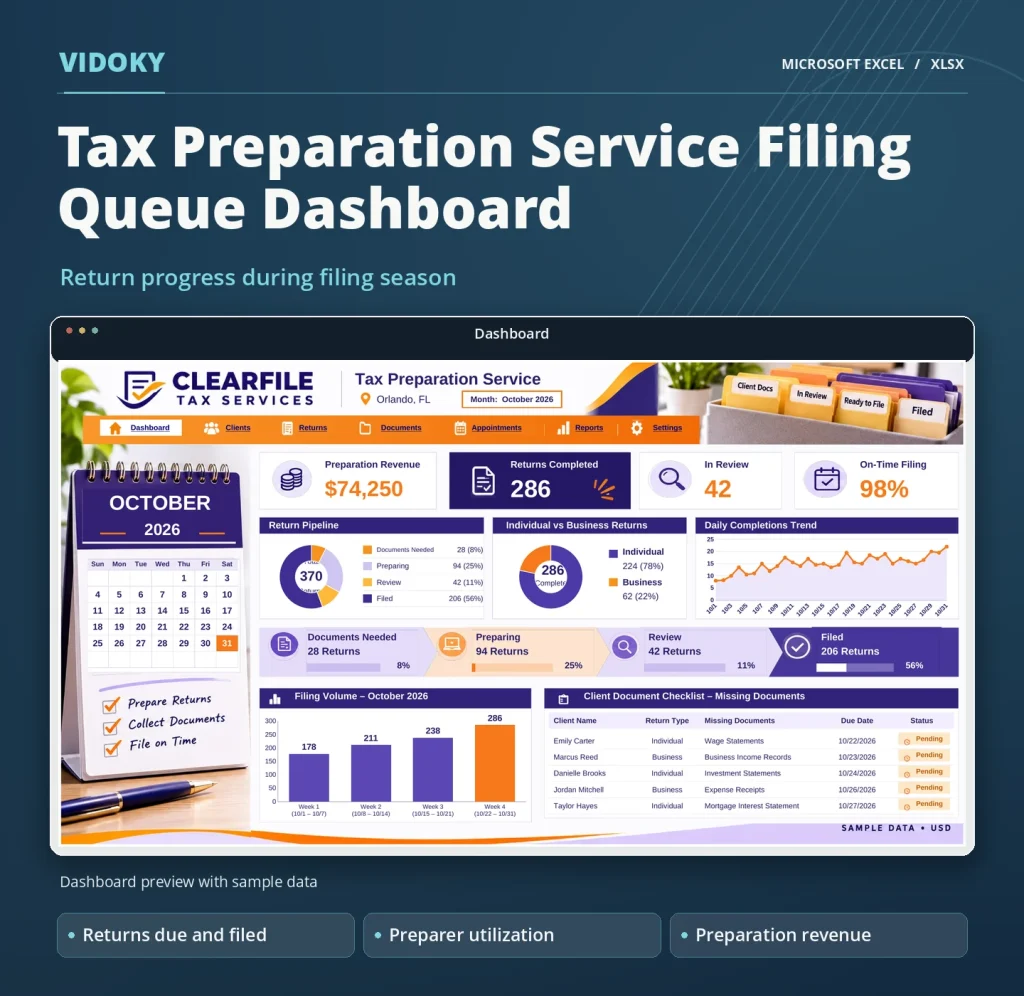
The Tax Preparation Service Filing Queue Dashboard gives a tax office a spreadsheet for reviewing its filing workload throughout a busy season. Open the Excel dashboard to see preparation revenue, returns completed, returns in review and on-time filing in one overview. Use the Tax filing queue sheet to record work due and completed by date and owner, and review preparer hours as the volume changes.
Keep the filing queue current
Enter returns due, returns filed, preparer hours available and billable hours in Tax filing queue. Give each record a date, reference, workstream and status so the team can identify the filings it covers. The sheet includes filing completion and preparer utilization figures. Use comparable date ranges and counts when you compare a personal return workstream and a business return workstream. Keep any detail needed to verify the number available to the responsible team member.
Use the owner and status fields to help identify why a group of returns is waiting. One group may be ready to file, while another might require a client appointment or document review. Add the dated callback or review to Appointments or Tasks as needed. At the next check-in, use the same reference to trace the outcome and verify whether the completion count should change.
Look at filing volume and preparation revenue
The dashboard has views for the return pipeline, individual and business return activity, and a daily completions trend. See how the example information is organized on Dashboard Data before you replace editable figures. Choose the same reporting month when comparing a completion figure and the related revenue. Make sure you understand whether a panel reflects sample inputs, transaction activity or the figures you entered for the current period.
For a peak week, start by comparing how many returns are due with how many are filed. Review the hours available for the people preparing returns and see where the workload is concentrated. Look at the daily trend to decide whether one working day needs closer inspection. A quick check of dates and statuses can reveal a late update or a grouping choice before you change the team's schedule.
Manage appointments and office reporting through the season
Use Calendar to see which meetings and due dates are coming up. Keep client-facing appointments and follow-up tasks dated so the team can find them during a quick handover. Projects can hold longer seasonal work, and Customers offers a place for the customer records your office uses for its workflow. Sales, Expenses and Profit & Loss are available for reviewing the figures behind the business period. Open Reports when you need to look through the records supporting a monthly figure.
A simple workstream name can make the queue easier to hand over. Pick names your team will recognize during the season and use those same labels in the monthly discussion.
The ZIP contains one editable XLSX. Open it in desktop Microsoft Excel, follow the Start Here instructions and run through the demonstration before setting up a copy for your season. Enter one group's count of returns, its owner and the corresponding preparer hours. Verify the reporting month, review the ratios and record the next check-in date so your team can keep the queue current as filings move through review and completion.
Reviews
4.8 out of 5 · 17 reviews
Nia · France
Good pick for a monthly look at tax filing queue.
Nia · United States
Tax Preparation Service Filing Queue has a clear use case here, especially for tax filing queue.
Peter · France
A handy starting point for tax filing queue.
Ruth · France
Setting aside time to compare open returns and filing deadlines would be a good way to put this dashboard for tax filing queue to work.
Nathan · Philippines
A practical starting point for tax filing queue.