
Finance & Accounting
Comparison price $15.00$9.99 33% off
↗
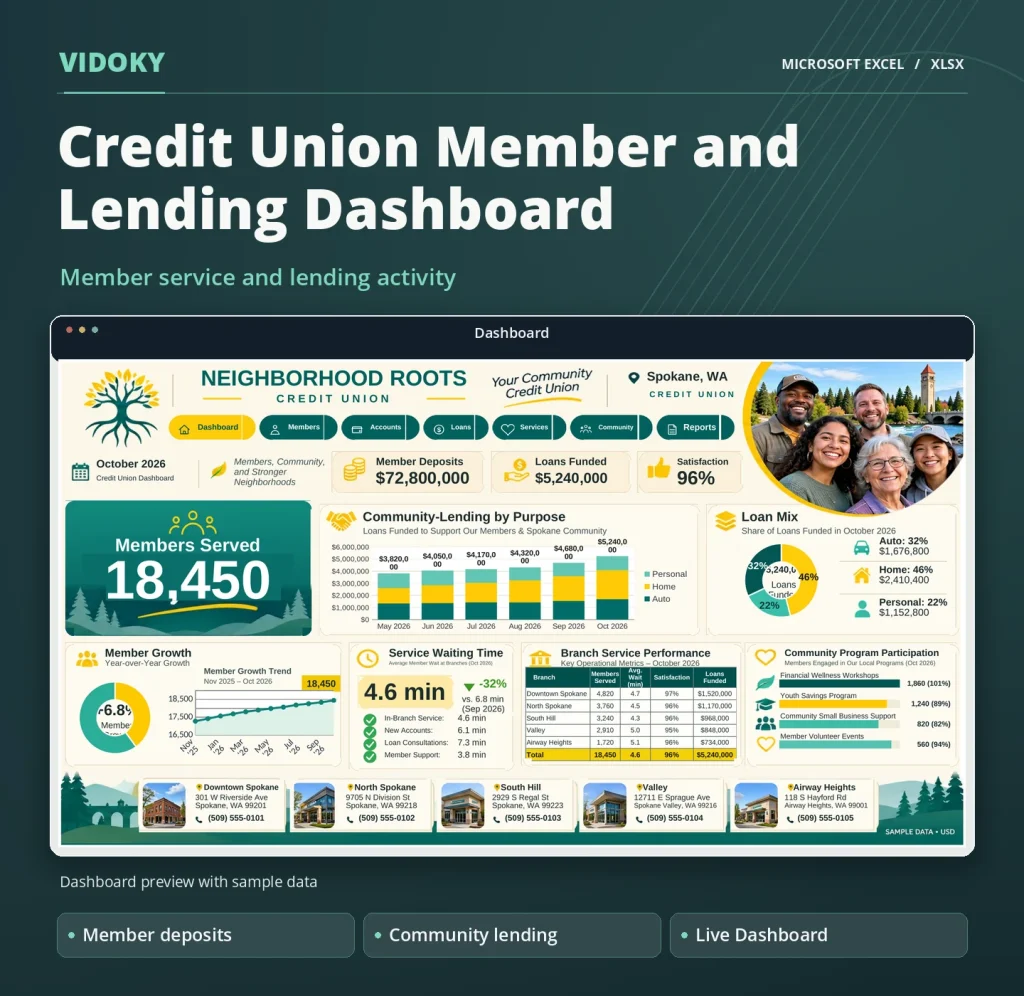
Preview is illustrative with fictional sample data. Open the downloaded workbook in desktop Microsoft Excel for the full, live version.
Credit Union Member and Lending Dashboard
- ▤ XLSX
- ↓ Instant download
Review member deposits, loan mix, lending activity and portfolio measures with credit union dashboard and reporting views in Excel.
Watch the video
Preview the Dashboard and Lending operations worksheets with sample data.
This public video is a demonstration. Your paid files are delivered after payment.
You may also like
Browse the shop ↗
Finance & Accounting
Comparison price $15.00$9.99 33% off
↗
Accounting Firm Client Deadlines Dashboard
Finance & Accounting
Comparison price $15.00$9.99 33% off
↗
Financial Advisor Client Practice Dashboard
What’s included
- One editable Excel workbook (.xlsx)
- Dashboard, Lending operations and related worksheets
Put member activity and lending measures into an Excel workbook your credit union team can review together. The Credit Union Member and Lending Dashboard includes an illustrated Dashboard, a Live Dashboard, and worksheets for lending operations and internal records. It provides a way to look at the sample member and loan figures before you set up the reporting period and enter information for your own team.
Review members, deposits and the local lending mix
Open Dashboard to see the credit union's visual overview. The workbook includes measures such as member deposits, loans funded, satisfaction and members served. Community-Lending by Purpose and Loan Mix offer different views of loan activity so you can see how lending is distributed in the example. Use the dashboard to decide which part of the story needs closer examination when a monthly total changes. A change in a loan mix can be easier to explain when you look at the underlying categories first.
Use Dashboard Data to review the demo inputs and understand how the design's figures are organized. The workbook has a separate Live Dashboard with a reporting month selector. Try the selected month and then a second month so you can see which view you will use when preparing a meeting. Follow the cell guidance for sample inputs and calculated fields while setting up your own workbook copy.
Capture lending review and exposure measures
Lending operations has fields for applications reviewed, applications approved, principal outstanding and past-due principal. The sheet includes ratios for application approval and past-due principal. Use the same scope and period for each pair of figures. Enter a reference and use workstream, status and owner to make it clear which part of the portfolio a row describes.
For a member-owned institution, it may be useful to compare two periods when demand shifts toward a particular loan purpose. Start with member and loan totals in the dashboard and then open the lending records for the relevant period. Check application counts and principal totals separately before interpreting a change in ratio. If a small group of larger loans influences the result, record that context in a meeting task or note and assign the verification to the person who has access to the source records.
Bring the month into one review file
The workbook includes Sales, Expenses, Reports and Profit & Loss for internal business reporting. Use the selected month and your ordinary office procedures to trace figures to the right sheet. Keep member information appropriate for an operational report, with references that allow the relevant team member to find the detailed records. Open Calendar, Projects or Tasks when the follow-up calls for a dated action.
In a branch review, use the same reporting date when the team compares deposit totals and lending activity. Write down the source period if the two figures update on different schedules.
Before the first reporting meeting, read Start Here, set a working reporting month and check the example lending ratios against the supporting counts. Review both dashboards and note which input sheets the team will maintain regularly. The purchase includes one ZIP with the editable Microsoft Excel workbook. Use desktop Excel to explore its original worksheet layouts, charts and sample figures before saving a copy for your credit union's own internal reporting.
Reviews
4.8 out of 5 · 22 reviews
Oliver · Switzerland
A practical dashboard option for credit union lending. It makes sense to plan a month-end check around member requests and loan activity.
Akosua · Japan
Well suited to a regular check on member requests and loan activity.
David · Belgium
The dashboard is pitched at a specific use. For credit union lending, a repeatable check on member requests and loan activity would be valuable.
Ava · United States
Practical idea for organising a review of credit union lending.
Ethan · Netherlands
This dashboard fits a routine check of member requests and loan activity.