
Finance & Accounting
Comparison price $15.00$9.99 33% off
↗
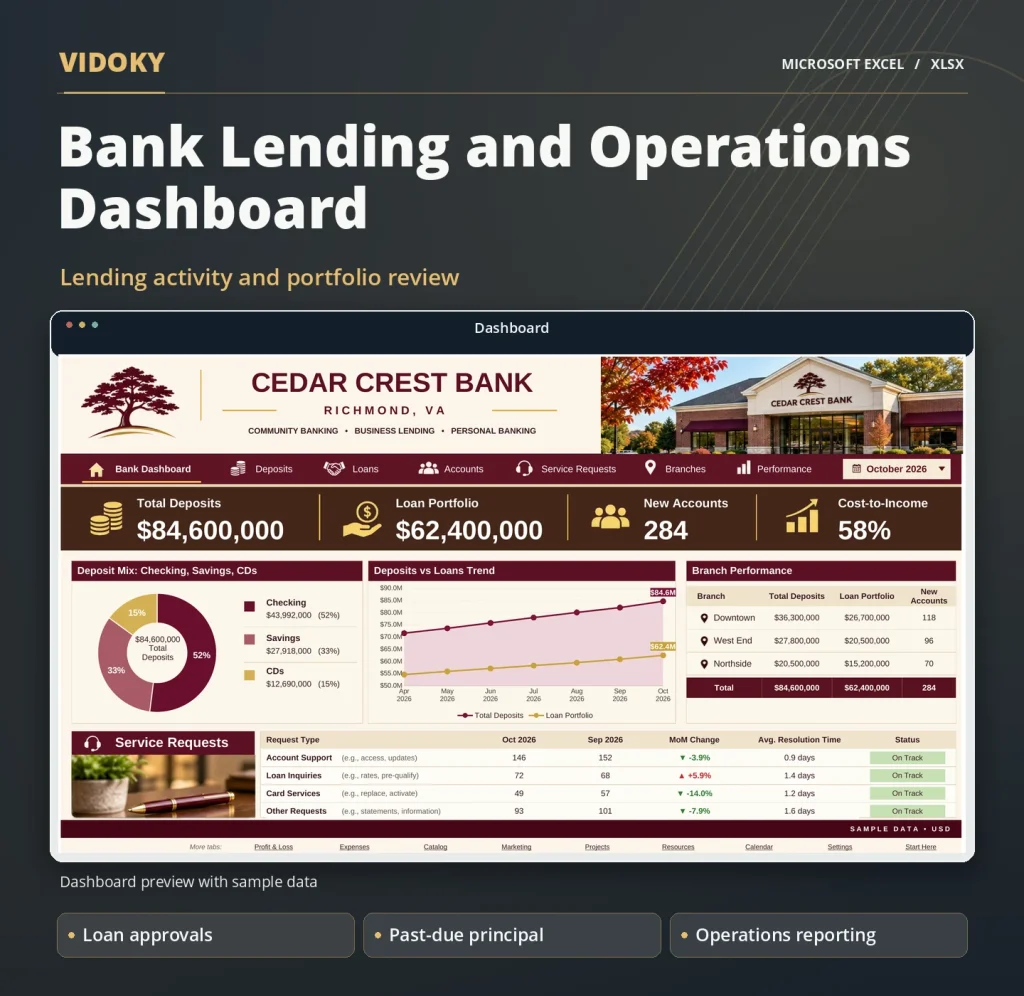
Preview is illustrative with fictional sample data. Open the downloaded workbook in desktop Microsoft Excel for the full, live version.
Bank Lending and Operations Dashboard
- ▤ XLSX
- ↓ Instant download
Track applications reviewed, loan approvals, outstanding principal and past-due exposure in this Excel lending operations workbook.
Watch the video
Preview the Dashboard and Lending operations worksheets with sample data.
This public video is a demonstration. Your paid files are delivered after payment.
You may also like
Browse the shop ↗
Finance & Accounting
Comparison price $15.00$9.99 33% off
↗
Accounting Firm Client Deadlines Dashboard
Finance & Accounting
Comparison price $15.00$9.99 33% off
↗
Financial Advisor Client Practice Dashboard
What’s included
- One editable Excel workbook (.xlsx)
- Dashboard, Lending operations and related worksheets
Use the Bank Lending and Operations Dashboard to organize a lending team's internal review in Excel. The workbook brings a bank dashboard together with a Lending operations sheet for recording loan review activity and principal exposure. It is suited to a team that wants a monthly reporting workbook for operational summaries, selected business figures and follow-up with clear owners.
Compare applications and approval activity
The Lending operations sheet has fields for applications reviewed and applications approved. Start with a defined date and reference for the batch or reporting group. Add the workstream and the owner who can explain the source totals. The approval-rate column helps the team compare approved cases with the number of applications it considered. Always look at the base count when comparing periods. A small group of reviews can move the percentage more than a large group.
Enter principal outstanding and past-due principal for the same group and period when using the exposure figures. The sheet includes a calculated past-due principal rate. Agree on a consistent reference date for both values and document the scope of the portfolio you use. Open the original records for exceptions. A repeated reference for the same group can distort the view, so give each reporting row a clear label when you combine data from different parts of a team.
Use the bank dashboard for the monthly discussion
The Dashboard provides a visual bank operations overview with deposits and lending-related views. Open Dashboard Data to inspect the editable demonstration figures behind the design. Use the workbook's report month control and read the number formats before replacing sample inputs. Run through the sample once so the people preparing the report understand where the displayed figures originate.
For a monthly discussion, take a dated snapshot of applications reviewed, approvals and outstanding principal. If past-due principal changes considerably, review both the size of the loan book and the reported amount in arrears for that date. Read the status and owner fields in Lending operations to identify who will verify an unusual value. Capture a dated task for an explanation that needs more work, then return to the report once that check is complete.
Keep the operating workbook easy to reconcile
The file includes Reports, Profit & Loss, Sales and Expenses for an internal reporting workflow. Use the Settings and Start Here tabs to review the workbook's layout and its sample inputs. Enter the office figures you plan to summarize on the appropriate sheets, then check the reporting period in the selected views. Store working references in the workbook using the level of detail permitted for your internal review.
Use Projects for longer follow-up work and Tasks for actions that need an owner. The Calendar and Appointments tabs can help the team coordinate an upcoming reporting meeting or a due date for data verification. Save a working copy before putting your own figures into the example. Start with one grouped lending record and verify both ratios against their underlying counts and amounts.
The customer ZIP contains a Microsoft Excel XLSX. Open the workbook in desktop Excel to inspect the dashboard, charts and clearly labeled spreadsheet tabs. Use the sample data to explore the worksheet layout before building a copy for your reporting period.
Reviews
4.9 out of 5 · 9 reviews
Ava · United Kingdom
Bank Lending and Operations has a clear use case here, especially for bank lending.
Ivy · Philippines
Helpful focus on bank lending without an overly broad business theme.
Amina · Ireland
Sensible dashboard choice for a weekly review of bank lending.
Adam · Denmark
Loan activity and operational workload make a good focus for this dashboard.
Isabella · Germany
Bank lending deserves a dedicated dashboard like this.