
Legal & Professional Services
Comparison price $15.00$9.99 33% off
↗
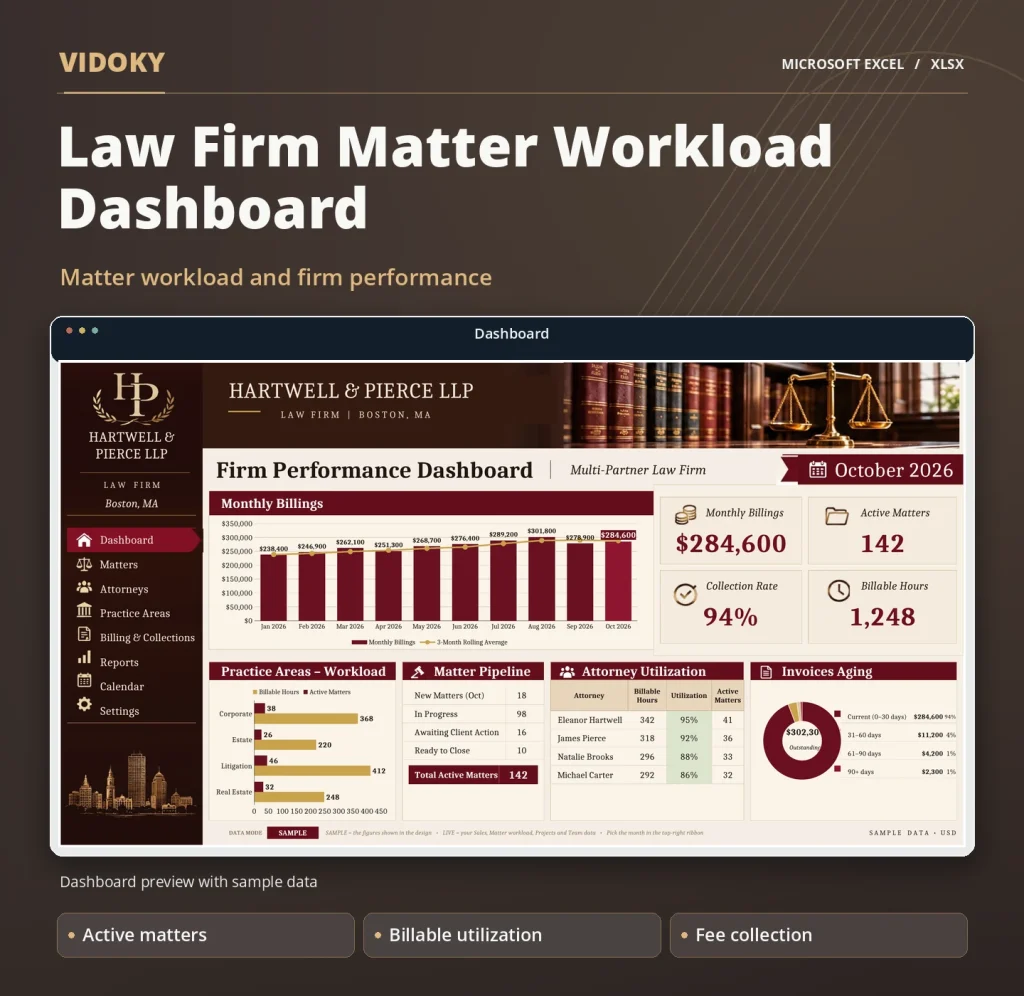
Preview is illustrative with fictional sample data. Open the downloaded workbook in desktop Microsoft Excel for the full, live version.
Law Firm Matter Workload Dashboard
- ▤ XLSX
- ↓ Instant download
Review active matters, monthly billings, fee collection and billable hours with a workload tracker designed for law firm teams.
Watch the video
Preview the Dashboard and Matter workload worksheets with sample data.
This public video is a demonstration. Your paid files are delivered after payment.
You may also like
Browse the shop ↗
Legal & Professional Services
Comparison price $15.00$9.99 33% off
↗
Attorney Office Case and Hearing Dashboard

Real Estate & Property
Comparison price $15.00$9.99 33% off
↗
Title Company Closing and Escrow Dashboard
What’s included
- One editable Excel workbook (.xlsx)
- Dashboard, Matter workload and related worksheets
A law firm's monthly review can involve active matters, time billed, payments received and the work that still needs an owner. The Law Firm Matter Workload Dashboard gives a practice an Excel workbook for organizing those operating measures. It includes a Firm Performance Dashboard, a Matter workload sheet and the reporting and office tabs that support a recurring review. The visual workbook preview shows monthly billings, active matters, collection rate and billable hours.
Enter matter activity in consistent groups
Open Matter workload when you need to log fee hours available, billable hours, earned fees billed and earned fees collected. Use a suitable reference and record the date, workstream, owner and status. The sheet includes calculated figures for billable utilization and fee collection. Enter comparable dates and scope for the related inputs before comparing ratios. Each row should represent a group of work you can trace to its source.
For example, a partner could review a group of ongoing business law matters and a separate group of one-time advisory engagements. Keep the workstreams distinct if they have different staffing or collection patterns. After reading the billable utilization figure, check the available and billed hours side by side. When you investigate collections, review the billed and collected amounts for the same group before planning a follow-up.
Use the dashboard to prepare a practice meeting
The dashboard highlights monthly billings and active matters alongside collection rate and billable hours. Review the supplied Dashboard Data to see how the example figures are organized. A dashboard figure can point to the right question for a meeting. Active matters can rise because a practice accepted more work, while billable hours can move with staffing and the type of work those matters require. Look through the corresponding records to understand the change in context.
Use Tasks or Projects to assign work after a monthly review. A dated task can cover a billing check, a client update or verification of hours in a specific workstream. Appointments and Calendar help the team coordinate preparation and upcoming meetings. Keep your row references compatible with the identifiers your firm uses and set up permissions for any working file that contains client matter information.
Keep the financial review connected to the firm's work
The workbook includes Sales, Expenses, Reports and Profit & Loss, with a reporting month for the profit and loss view. Enter the business figures you intend to review, then match your reporting period to the workstream records open during the meeting. If an amount looks unexpected, trace it to an entry before making staffing or collection decisions. Check the status and owner of related work so the right person can act on the result.
Before reviewing collection by workstream, check that the billed and collected amounts are recorded for the same group. Keep a note when a receipt will be allocated later.
Download the ZIP and extract the editable XLSX. Open it in desktop Microsoft Excel, then follow Start Here to learn the workbook's setup and sample data. Start your firm's working copy with one practice group and a complete reporting period. Check that the billable rate and collection figures represent the scope you intended. The workbook gives you a repeatable place to review monthly matter activity and the records behind it as the practice grows.
Reviews
4.9 out of 5 · 19 reviews
Daniel · Philippines
Good dashboard.
Isaac · France
Sensible dashboard choice for a weekly review of legal matter workload.
Zara · United Kingdom
This dashboard could anchor a short review of legal matter workload and highlight where to look more closely at case assignments and capacity.
Amara · France
Good pick for a monthly look at legal matter workload.
David · United States
The dashboard format makes sense for legal matter workload.