
Real Estate & Property
Comparison price $15.00$9.99 33% off
↗
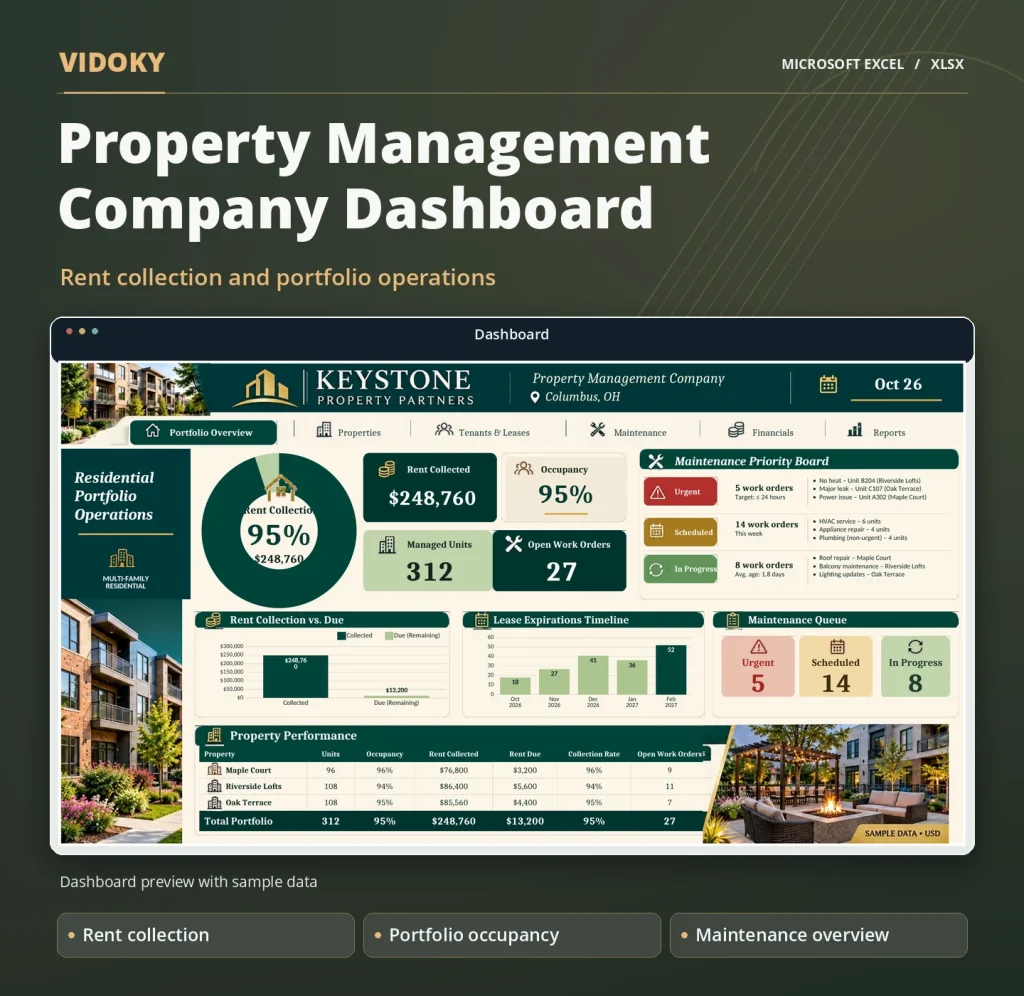
Preview is illustrative with fictional sample data. Open the downloaded workbook in desktop Microsoft Excel for the full, live version.
Property Management Company Dashboard
- ▤ XLSX
- ↓ Instant download
Monitor rent billed and collected, occupied unit-days and property workflows in an Excel workbook with a portfolio dashboard and reports.
Watch the video
Preview the Dashboard and Property operations worksheets with sample data.
This public video is a demonstration. Your paid files are delivered after payment.
You may also like
Browse the shop ↗
Real Estate & Property
Comparison price $15.00$9.99 33% off
↗
Mortgage Company Loan Pipeline Dashboard

What’s included
- One editable Excel workbook (.xlsx)
- Dashboard, Property operations and related worksheets
Review occupancy, rent and portfolio work without losing track of the dates behind each figure. The Property Management Company Dashboard is an Excel workbook for a residential property manager or small management office. Its dashboard includes rent collected, occupancy, managed units and open work orders. A separate Property operations sheet gives the team a place to keep the counts that help explain the month's activity.
Understand occupancy and rent collection
In Property operations, record rent billed, rent collected, available unit-days and occupied unit-days by date. Add a reference, workstream, status and owner when a row needs context. Occupancy is based on the available and occupied unit-days you enter. Use a consistent period and portfolio scope for both counts. If a unit is out of service for part of the month, make a note about how the available days were calculated so someone else can reconcile the total.
Rent collection compares receipts with the rent billed for the period you log. Think about how your business handles payments that arrive after the billing month and record your approach in a note or working convention. A dated reference can be helpful if you later need to check a property record or speak with a team member about a collection difference. Use the calculated columns to review ratios alongside the input counts.
Read the dashboard before planning portfolio work
The dashboard includes a Rent Collection view and a Maintenance Priority Board. Use the visual overview to identify questions that need a more detailed check. For example, rent collection could dip during a month when a unit is between tenants and several maintenance jobs are open. Look first at the recorded dates and portfolio counts, then review the responsible owner and the relevant task or project. Use the Dashboard Data sheet to understand which figures in the example can be replaced.
Projects, Tasks and Appointments give you places to record the work behind an upcoming inspection, vendor visit or follow-up. Calendar provides a view of dated work. Keep a clear owner and reference when several people handle the same building. When you review open issues at the end of a week, use those references to tie a target date back to the row or project you intended to discuss.
Keep the management business's reporting organized
Use Sales and Expenses to enter the business activity you need for monthly reporting. Open Profit & Loss for the month and examine the figures behind the results using the workbook's transaction sheets. An operations ratio helps you understand the properties, and the financial reports help you review the management company's accounting records. Choose the same month for the discussion and make sure the date filters represent the period you are trying to compare.
Use Start Here to learn the workbook's navigation and Settings. Take one property or a small group of properties through a trial month first. Review the original Dashboard view, then open Property operations and check how representative counts are entered. The individual download ZIP contains the editable Microsoft Excel workbook. Open it in desktop Excel to see its charts, worksheet navigation and demo figures before you set up a working copy.
Reviews
4.9 out of 5 · 20 reviews
Kwame · Philippines
A practical starting point for property operations.
Kwame · France
The dashboard is pitched at a specific use. For property operations, a repeatable check on rent activity and property workloads would be valuable.
Mia · Singapore
Good dashboard idea for reviewing rent activity and property workloads.
Akosua · Philippines
Relevant to Property Management Company and the day-to-day work behind property operations.
Eric · Sweden
A useful option for anyone tracking property operations.