

Independent Business Managers
Comparison price $15.00$9.99 33% off
↗
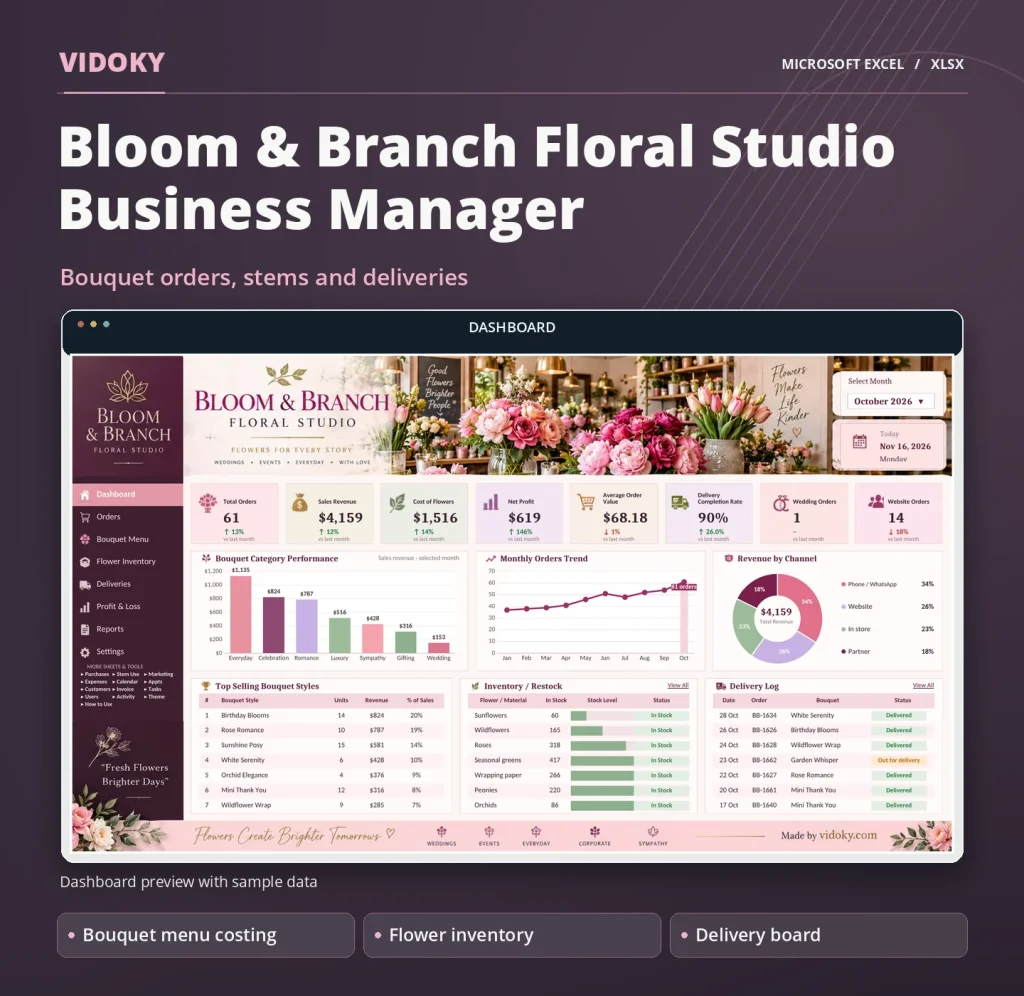
Preview is illustrative with fictional sample data. Open the downloaded workbook in desktop Microsoft Excel for the full, live version.
Bloom & Branch Floral Studio Business Manager
- ▤ XLSX
- ↓ Instant download
Manage bouquet costs, florist orders, stem usage and delivery status with a floral studio dashboard and Excel workbook.
Watch the video
Preview the DASHBOARD and Bouquet Menu worksheets with sample data.
This public video is a demonstration. Your paid files are delivered after payment.
You may also like
Browse the shop ↗
Independent Business Managers
Comparison price $15.00$9.99 33% off
↗
Vidoky Coffee Shop Team Business Manager

Independent Business Managers
Comparison price $15.00$9.99 33% off
↗
AquaGloss Car Wash Business Manager
What’s included
- One editable Excel workbook (.xlsx)
- DASHBOARD, Bouquet Menu and related worksheets
A floral studio has to keep track of orders, delivery fees, the stems that go into each bouquet and flowers that arrive for a specific event. The Bloom & Branch Floral Studio Business Manager gives those records a home in Excel. The main dashboard brings together order counts, sales revenue, flower costs, profit, delivery completion and average order value for a selected month. It is designed for a florist with a product menu, a delivery routine and orders coming in through several channels.
Price your bouquet menu and record customer orders
Use Bouquet Menu for the product name, category, selling price, unit cost, palette and recipe notes. Recipe notes are a practical place to capture the stems, greens and wrapping used in a standard arrangement. When you change the price or bill of materials for a bouquet, check both the selling price and the unit cost before taking orders at the new price. Use a consistent name for the bouquet in future entries.
Go to Orders to enter the date, bouquet, quantity, discount and delivery fee. Check the calculated sales and cost columns as you get familiar with the sheet. Enter the payment method and order status so it is easier to review which orders have been completed. If you sell through your website, in the studio and through event inquiries, apply a consistent channel label. Dashboard views for revenue by channel and bouquet category performance make those labels valuable during a monthly review.
Follow stock from purchasing to arrangements
Use Purchases to record what you receive and Flower Inventory to look at available stock. Enter Stem Usage when you make arrangements or prepare an event. Pick a consistent unit for each flower or supply, especially when stems arrive by bunch and are used one by one. Match the flower names your team uses in the bouquet recipes to the names in stock.
Picture a wedding order that calls for a larger quantity of a particular stem than you stock in an ordinary week. Review the order date and bouquet quantities, then look through your flower stock and planned purchases before committing to the handoff. After making the arrangements, record actual usage and review any remaining stems for the following orders. You can use the same workflow for a single bouquet when an unusual substitution affects your expected cost.
Keep the delivery board accurate during busy periods
Use Deliveries to bring together the order ID, delivery zone, courier, fee and status. Match the ID to the order you entered earlier so the team can find the sale quickly. Review delivery completion on the Dashboard along with average order value and wedding or website order counts. Those views help you plan the coming week when both events and individual bouquets are competing for delivery slots.
Use the delivery board to review handoffs during event weeks. Confirm the courier, delivery zone and order status in the same view before you close out the order.
The workbook also contains Appointments, Calendar, Tasks, Invoice, Reports and Profit & Loss. Use those views when you need to review a consultation, check the month or prepare an invoice. Open the delivered Excel workbook in Microsoft Excel and read START HERE. Walk through the demo orders once and then use a copy for your own menu, stem records, customers and delivery board.
Reviews
4.9 out of 5 · 8 reviews
Theo · Switzerland
Very useful!
Amara · Sweden
Useful tracker concept for putting floral orders in one place.
Leah · Norway
Stem costs and studio sales make a good focus for this tracker.
Fatima · Denmark
For floral orders, this tracker is a sensible starting point. A weekly check could cover stem costs and studio sales.
Isabella · New Zealand
A practical starting point for floral orders.