
Independent Business Managers
Comparison price $15.00$9.99 33% off
↗
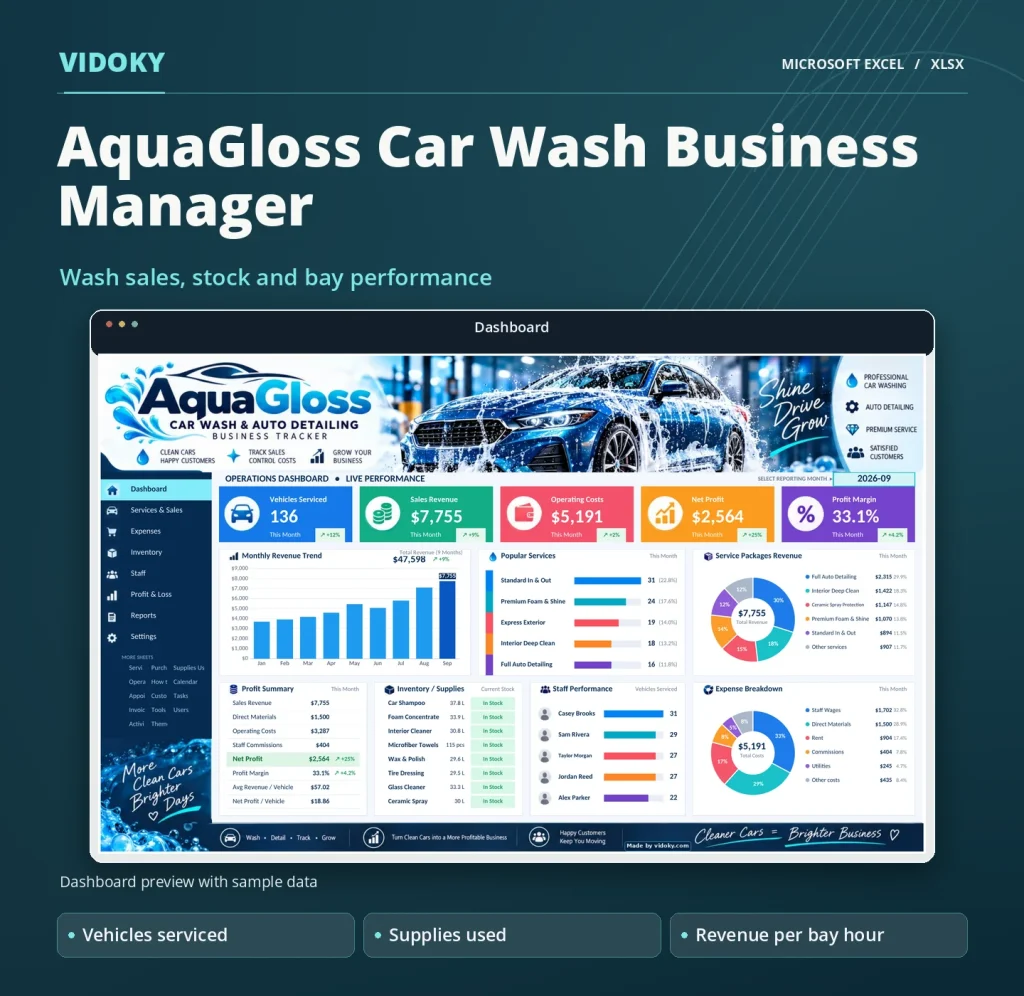
Preview is illustrative with fictional sample data. Open the downloaded workbook in desktop Microsoft Excel for the full, live version.
AquaGloss Car Wash Business Manager
- ▤ XLSX
- ↓ Instant download
Track wash sales, bay hours, vehicle counts, stock usage and monthly profitability in the AquaGloss car wash Excel workbook.
Watch the video
Preview the Dashboard and Operations worksheets with sample data.
This public video is a demonstration. Your paid files are delivered after payment.
You may also like
Browse the shop ↗
Independent Business Managers
Comparison price $15.00$9.99 33% off
↗
Vidoky Coffee Shop Team Business Manager
Independent Business Managers
Comparison price $15.00$9.99 33% off
↗
Bloom & Branch Floral Studio Business Manager
What’s included
- One editable Excel workbook (.xlsx)
- Dashboard, Operations and related worksheets
Use the AquaGloss Car Wash Business Manager to review the jobs and costs behind a wash bay, detailing service or small auto spa. This Excel workbook gives owners and shift leads a place to record sales, vehicles served, bay hours, supplies, staffing and daily expenses. The dashboard brings up a selected month so you can see vehicle counts, operating costs, service revenue and profitability beside the service mix.
Review what runs through each bay
Go to Operations to record the date, shift, vehicles, staffing, bay hours and revenue for a completed block of work. Use the revenue-per-hour field to compare a busy shift with a quieter one. Look back at the services performed before drawing a conclusion from the rate. A full detail can take longer than a quick wash, and the mix can change the amount you earn per bay hour. Add short notes about scheduling or equipment issues when those explain a change.
Enter your sale details on Sales and maintain the names and prices of your offerings in Service Menu. Save a consistent name for each package so a service can be compared month to month. If you introduce an upgrade, choose a distinct name and use it on future sales. Review Monthly Revenue Trend and the service package revenue panel on Dashboard to see which offerings contribute to the selected month.
Track supplies and the cost of delivering a service
Use Purchases for soap, wax, towels and other incoming stock. Keep supplies in Inventory and record materials consumed under Supplies Used. Match familiar units such as bottles, liters or packs to the way your team counts each item. If you buy concentrate by the case, record a unit you can apply consistently when you estimate how much the service used.
Suppose an express wash promotion brings in more vehicles, but a second employee and extra supplies are required to keep the queue moving. Compare the affected days in Operations, check related costs in Expenses and open Profit & Loss for the reporting period. Looking through those tabs provides context when sales rise faster or slower than your operating profit. The workbook also has separate Staff and Reports sheets for a more focused review.
Keep the booking and customer records close
Use Appointments and Calendar to look ahead to scheduled services. Add recurring follow-ups or maintenance to Tasks so the shift team can see the work that needs attention alongside new bookings. Customers gives you a place to enter the customer information you need for appointments or invoices. When a detail takes more than one shift, a clear service name and date make it easier for the next person to find the sale.
On days with more than one shift, enter each shift using the same bay-hour convention so the numbers can be compared during the next operations review.
Use desktop Microsoft Excel and open START HERE first. Inspect the supplied sample month and the noted sheets for the entry workflow, then save a copy and set the reporting month to suit your business. The download includes the AquaGloss XLSX in one ZIP. Review the dashboard with your team when you change the service list, staffing pattern or inventory units, so everyone understands which fields to maintain.
Reviews
5.0 out of 5 · 7 reviews
Mason · Germany
A sensible tracker for keeping track of wash jobs and daily takings.
Thandi · Australia
The AquaGloss Car Wash tracker is a relevant choice when wash jobs and daily takings need a regular review.
Ava · United Kingdom
For car wash scheduling, this tracker is a sensible starting point. A weekly check could cover wash jobs and daily takings.
Theo · Denmark
Useful tracker concept for putting car wash scheduling in one place.
Hannah · Ireland
Car wash scheduling deserves a dedicated tracker like this.